Tuesday, December 31, 2013

Deep Purple - Soldier of Fortune

Read full details here:
Deep Purple - Soldier of Fortune

This is the era of Computing and we are the “Soldier of Fortune”.
Thanks all my fans, visitors, readers and supporters.
Here’s my favorite song dedicated to everyone. Hope 2013 was fantastic and wishing everyone a happy and prosperous 2014.

Happy New YEAR!!!

Artist: Deep Purple
Album: Stormbringer, 1974
Title: Soldier of Fortune
Songwriters: Ritchie Blackmore, David Coverdale



Read the rest of it here: Deep Purple - Soldier of Fortune

Saturday, December 28, 2013

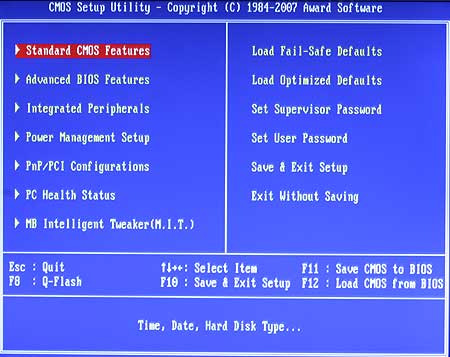
Enable USB Boot in Gigabyte Motherboard

Read full details here:
Enable USB Boot in Gigabyte Motherboard


I've got this Gigabyte Motherboard GA-P35-DS3L (rev. 2.0) in my old desktop running Q6600 Quad Code CPU and 4GB RAM. I've used this computer for last 5 years and to be honest, it's still superb compared to some newer machines I've used recently. I installed Windows 7 and Kali Linux on it and after almost 2 years I decided it's time to reformat and re-install everything from scratch. Easier said than done. I put a USB disk with Windows 7 on it and rebooted. My Gigabyte motherboard doesn't detect it Live USB! I can honestly say, it did last time I tried. Naturally, I thought, I must've messed up my Live Windows 7 USB stick. So, I tried Linux (Kali Linux, Ubuntu, Arch .. you name it), still Gigabyte motherboard doesn't detect any of the Live USB's. I so started looking to motherboard to figure out how to enable USB boot in Gigabyte Motherboard.


Read the rest of it here: Enable USB Boot in Gigabyte Motherboard

Thursday, December 19, 2013

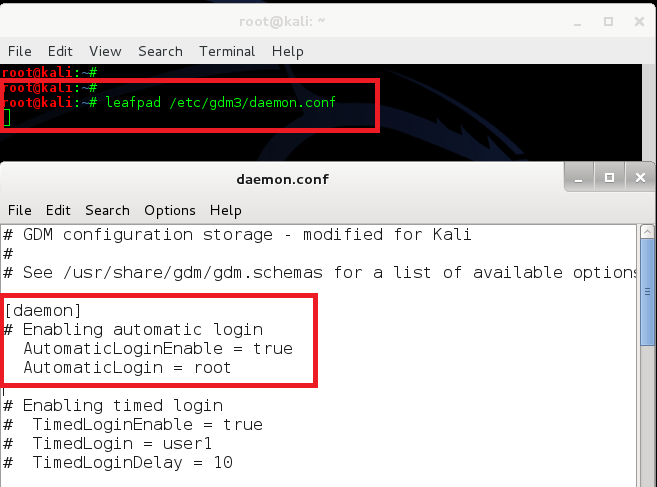
Auto login root user at system start in Kali Linux - GNOME and KDE

Read full details here:
Auto login root user at system start in Kali Linux - GNOME and KDE


Kali Linux is a Debian-derived Linux distribution designed for digital forensics and penetration testing. It is maintained and funded by Offensive Security Ltd. Mati Aharoni and Devon Kearns of Offensive Security developed it by rewriting BackTrack, their previous forensics Linux distribution.
By default root is the only user account in Kali Linux. It doesn’t present any option to create another user during installation. It however presents an option to set root password during installation. You need root privileges to run pretty much everything in Kali Linux. You can create another non root standard user (See previous post: Add remove user (standard user/non-root) in Kali Linux) for day to day use given that Kali is your Primary Linux distribution but it might get tedious to type in the root password every time you login. This guide will show you how to make a simple few line changes to allow your auto login root  user at system start or boot time in both KDE and GNOME Desktop.


Read the rest of it here: Auto login root user at system start in Kali Linux - GNOME and KDE

Wednesday, December 18, 2013

Fix "WARNING: The following packages cannot be authenticated!" in Kali Linux

Read full details here:
Fix "WARNING: The following packages cannot be authenticated!" in Kali Linux

I just reinstalled Kali 1.0.5 and successfully did apt-get update and apt-get upgrade. But when I am trying to do an apt-get dist-upgrade I get this error
“WARNING: The following packages cannot be authenticated!”
Obviously I don’t want to install un-authenticated package. So I cancelled. Did some Googling and different people in different versions of Linux seems to have similar problem, however there wasn’t any clean solution specific for Kali Linux. I finally managed to figure it out and decided to write a small guide on it. So, next time someone else having the same issue, all they need to do is follow my guide and it will be fixed.

Fix WARNING The following packages cannot be authenticated! in Kali Linux - 1 - blackMORE Ops


Read the rest of it here: Fix "WARNING: The following packages cannot be authenticated!" in Kali Linux

Monday, December 16, 2013

Installing Tor In Kali Linux

Read full details here:
Installing Tor In Kali Linux

How to install Tor - logo - blackMORE Ops

What is Tor?

Tor is free software and an open network that helps you defend against traffic analysis, a form of network surveillance that threatens personal freedom and privacy, confidential business activities and relationships, and state security. This guide guides your through installing tor in Kali Linux.

Why anonymity matters?

Tor protects you by bouncing your communications around a distributed network of relays run by volunteers all around the world: it prevents somebody watching your Internet connection from learning what sites you visit, and it prevents the sites you visit from learning your physical location.


Read the rest of it here: Installing Tor In Kali Linux

Thursday, December 12, 2013

How to change hostname in Kali Linux?

Read full details here:
How to change hostname in Kali Linux?


Kali Linux is becoming popular and more and more users are using it to try out different things. When installing kali, you get to choose a hostname, but in case you accepted the default hostname (kali) and later want to change it, here’s a How to guide to change hostname in Kali Linux.
Now...


Read the rest of it here: How to change hostname in Kali Linux?

How to change hostname in Kali Linux?

Read full details here:
How to change hostname in Kali Linux?


Kali Linux is becoming popular and more and more users are using it to try out different things. When installing kali, you get to choose a hostname, but in case you accepted the default hostname (kali) and later want to change it, here’s a How to guide to change hostname in Kali Linux.
Now...


Read the rest of it here: How to change hostname in Kali Linux?