Sunday, February 15, 2015

In light of recent Linux exploits, Linux security audit is a must!

Read full details here: In light of recent Linux exploits, Linux security audit is a must!


How many Linux vulnerabilities and exploits were exposed since last 6 months? Many! With recent Shellshock, Heartbleed, Poodle, Ghost and maybe many more to come. Suddenly, I didn’t feel that much secure anymore with my Linux as it’s the core packages that are affected.. What’s next? My openVPN is not secured anymore? My SSH session keys are vulnerable? I decided to do a Linux security audit of my Linux system. After setting up an external firewall, I suddenly realized, it’s just too big for me to do it manually. That’s when I found Lynis. Lynis is an open source security auditing tool. It was reasonably well documented and did many things quickly that could’ve took me ages.

Linux security audit - blackMORE Ops - 5

For this whole test, I used Lynis free version.


How Linux security audit works?

Lynis will perform hundreds of individual tests to determine the security state of the system. Many of these tests are also part of common security guidelines and standards. Examples include searching for installed software and determine possible configuration flaws. Lynis goes further and does also test individual software components, checks related configuration files and measures performance. After these tests, a scan report will be displayed with all discovered findings.
Typical use cases for Lynis:
  1. Security auditing
  2. Vulnerability scanning
  3. System hardening

Installation

You can install Lynis from repository (i.e. using yum or apt-get) but I found that it’s not the most up-to-date version of Lynis. You’re better off downloading it to a local directory and running it from there.

Lynis with Installation – package

Although no installation is needed, a common method to use Lynis is installing it via a package. This could be with the repositories provided by the operating system, or a manually created package. Please note that some repositories go for stability and don’t update software after the release, with exception of security updates. This might result in using a very old version of Lynis and is usually not preferred. So before using a package, confirm that updates are provided.
Red Hat based: $ sudo yum install lynis
Debian based: $ sudo apt-get install lynis


Read the rest of it here: In light of recent Linux exploits, Linux security audit is a must!

Saturday, February 14, 2015

Linux file system hierarchy

Read full details here: Linux file system hierarchy

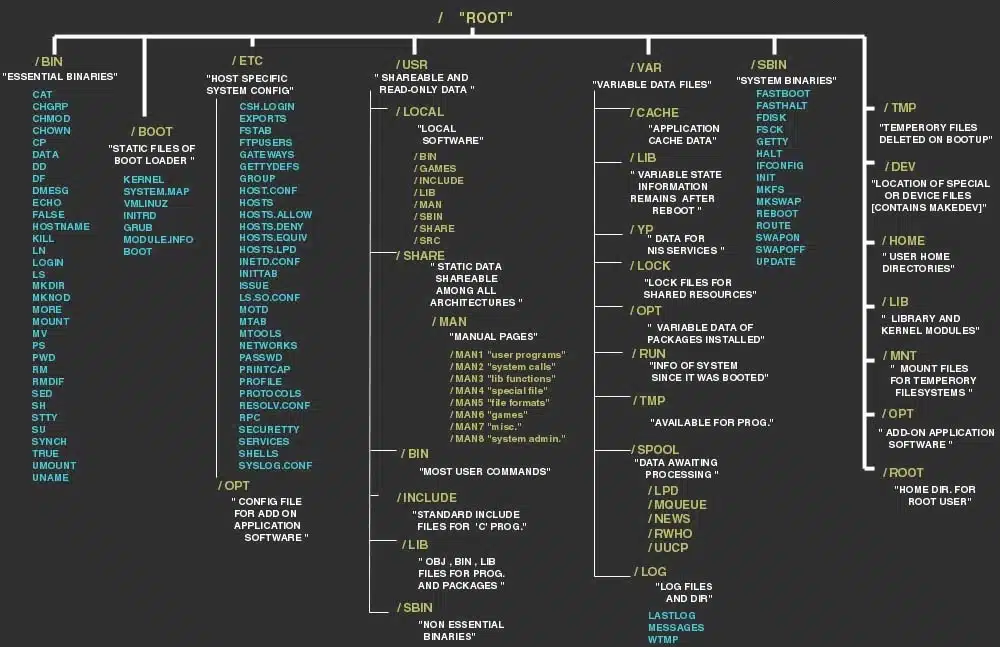
What is a file in Linux? What is file system in Linux? Where are all the configuration files? Where do I keep my downloaded applications? Is there really a filesystem standard structure in Linux? Well, the above image explains Linux file system hierarchy in a very simple and non-complex way. It’s very useful when you’re looking for a configuration file or a binary file. I’ve added some explanation and examples below, but that’s TLDR.


What is a file in Linux?

A simple description of the UNIX system, also applicable to Linux, is this:
On a UNIX system, everything is a file; if something is not a file, it is a process.
This statement is true because there are special files that are more than just files (named pipes and sockets, for instance), but to keep things simple, saying that everything is a file is an acceptable generalization. A Linux system, just like UNIX, makes no difference between a file and a directory, since a directory is just a file containing names of other files. Programs, services, texts, images, and so forth, are all files. Input and output devices, and generally all devices, are considered to be files, according to the system.
In order to manage all those files in an orderly fashion, man likes to think of them in an ordered tree-like structure on the hard disk, as we know from MS-DOS (Disk Operating System) for instance. The large branches contain more branches, and the branches at the end contain the tree’s leaves or normal files. For now we will use this image of the tree, but we will find out later why this is not a fully accurate image.


Read the rest of it here: Linux file system hierarchy

Thursday, February 12, 2015

Kali Linux 1.1.0 kernel 3.18 - Install proprietary NVIDIA driver - NVIDIA Accelerated Linux Graphics Driver

Read full details here: Kali Linux 1.1.0 kernel 3.18 - Install proprietary NVIDIA driver - NVIDIA Accelerated Linux Graphics Driver

Install NVIDIA driver on Kali Linux 1.1.0

This guide explains how to install proprietary "NVIDIA Accelerated Linux Graphics Driver" or NVIDIA driver on Kali Linux 1.1.0 kernel 3.18 system. By default Kali Linux installs open source NVIDIA driver nouveau which works great if you just want a display. Open source drivers can be confirmed by using lsmod | grep nouveau command. But like I said in my previous guides, it doesn't give you 3D acceleration features or GPU acceleration based applications (such as CUDA and GPU pass through). That means you MUST install proprietary NVIDIA driver.


The proprietary "NVIDIA Accelerated Linux Graphics Driver" provides optimized hardware acceleration of OpenGL applications via a direct-rendering X server. It is a binary-only Xorg driver requiring a Linux kernel module for its use. The first step is to fully update your Kali Linux system and make sure you have the kernel headers installed.


This guide replaces the old guides
  1. How to Install NVIDIA Kernel Module CUDA and Pyrit in Kali Linux
  2. Install proprietary NVIDIA driver on Kali Linux – NVIDIA Accelerated Linux Graphics Driver
  3. Kali Linux 1.0.7 kernel 3.14 – Install proprietary NVIDIA driver
I had to divide it into two parts:
  1. Kali Linux 1.1.0 kernel 3.18 - Install proprietary NVIDIA driver - NVIDIA Accelerated Linux Graphics Driver
  2. Kali Linux 1.1.0 kernel 3.18 - Install NVIDIA driver kernel Module CUDA and Pyrit on Kali Linux – CUDA, Pyrit and Cpyrit-cuda (pending)
You use the first guide to install NVIDIA Driver on Kali Linux 1.1.0 kernel 3.18. For normal users, you should just stop here and enjoy your nice smooth NVIDIA graphics. Install some game or enjoy a movie.
I've included as much details I can, including troubleshooting steps and checks but I would like to hear your part of the story, so leave a comment with your findings and issues.


Read the rest of it here: Kali Linux 1.1.0 kernel 3.18 - Install proprietary NVIDIA driver - NVIDIA Accelerated Linux Graphics Driver

Monday, January 12, 2015

Introducing Kali Linux NetHunter and NetHunter supported devices

Read full details here: Introducing Kali Linux NetHunter and NetHunter supported devices


NetHunter is an Android penetration testing platform for Nexus and OnePlus devices built on top of Kali Linux, which includes some special and unique features. Of course, you have all the usual Kali tools in NetHunter as well as the ability to get a full VNC session from your phone to a graphical Kali chroot, however the strength of NetHunter does not end there.

As an experienced penetration tester or security professional, it is imperative that you trust the tools you work with. One way to achieve this trust is by having full transparency and familiarity with the code you are running. You are free to read, investigate, and change NetHunter protects build scripts for the NetHunter images. All of this goodness from the house of Offensive Security and developers of Kali Linux!


Read the rest of it here: Introducing Kali Linux NetHunter and NetHunter supported devices

Thursday, January 8, 2015

Denial of Service Attack Proof of Concept PHP Exploit for WordPress DoS Attack - CVE-2014-9034

Read full details here: Denial of Service Attack Proof of Concept PHP Exploit for <=4.0 WordPress DoS Attack - CVE-2014-9034

Proof of Concept PHP exploit for WordPress DoS Attack CVE-2014-9034 worked like a charm on my own WordPress website. Surprisingly, CVE-2014-9034 was published for sometime and it seems WordPress still hasn't fixed this issue. I will explain how to use this Proof of Concept tool and test your own WordPress website for vulnerabilities.

WordPress DoS Attack - CVE-2014-9034

Credit for WordPress DoS Attack (Denial of Service Proof of Concept PHP Exploit CVE-2014-9034: WordPress <=4.0) goes to John from http://secureli.com. I will explain how to use this Proof of Concept tool and test your own WordPress website for vulnerability.

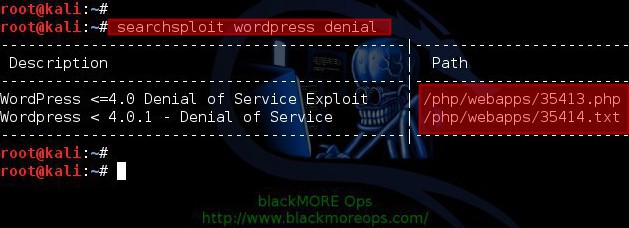
Searching exploit using searchspoit

How many of you used searchsploit in Kali Linux? It's a nice tool that updates and downloads exploits often. I use it quite extensively along with MetaSploit.
Use searchsploit to search specific exploits. You can use it like this:
root@kali:~# searchsploit wordpress denial
---------------------------------------------|---------------------------------- 
 Description                                 |  Path
---------------------------------------------|----------------------------------
WordPress <=4.0 Denial of Service Exploit    | /php/webapps/35413.php
Wordpress < 4.0.1 - Denial of Service        | /php/webapps/35414.txt
---------------------------------------------|----------------------------------
root@kali:~#


Read the rest of it here: Denial of Service Attack Proof of Concept PHP Exploit for <=4.0 WordPress DoS Attack - CVE-2014-9034

Wednesday, December 31, 2014

Determine if a disk is SSD or HDD

Read full details here: Determine if a disk is SSD or HDD


This is one of those random things I do and decided to put it in the website. I know that my personal computer is running on HDD, but when I am logged into a remote Linux system and suddenly I started wondering about how to determine if the underlying disk is SSD or HDD, I wasn’t too sure what to look for. A quick Google search returned the best possible solution and I thought, hey maybe I should…


Read the rest of it here: Determine if a disk is SSD or HDD

Friday, December 19, 2014

darodar.com referrer spam and What to do?

Read full details here: darodar.com referrer spam and What to do?


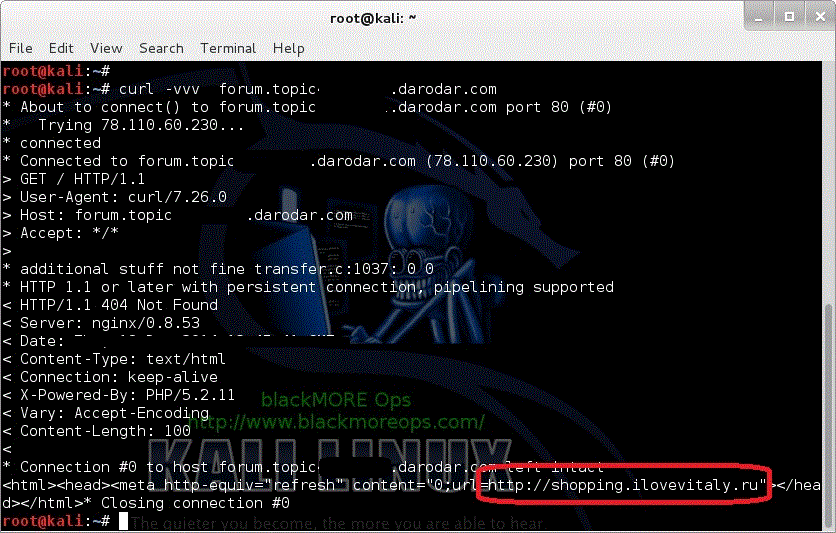
I had some interesting traffic showing up in my Google Analytics today. So far I’ve seen 21 referral traffic from forum.topic55798995.darodar.com to my home page http://www.blackmoreops.com/.


What is more scary?

You know what? I am not worried about this darodar.com referral spam / referrer spam. The worst that can happen is you see some funny links in your Google Analytics. Just don’t browse to those sites.
But the part that’s more disturbing is that anyone with some programming skill can actually create a tool to randomize Google Analytics code and send Fake visiting info back to Google. Followings are the implications:
  1. You can target a legit website and spam others using them as referrer. The result? Google demotes a perfetly good website because someone else spammed forged their GA code to spam others.
  2. You can target a website and spam using their GA code. The result? That website appears in millions of GA users and if even 5% of them visit that website, it might just overload their server and create a DDoS situation for them. I tested a tool named GoldenEye which was able to create 100’s of legit connections from same IP and GA thought they were real users. There’s obviously some more fine tuning required on Google’s behalf.
  3. Someone exploits your GA code and Google can just BAN your GA account, no explanations will be given. Your AdSense account can be exploited and banned in similar ways.

Open question to everyone

Anyone assessed this referrer spam on Bing/Alexa/Yandex?
This spam is too broad scale to be useful for BlackHAT SEO but if someone manages to do it carefully on Bing/Alexa/Yandex/DuckDuckGo or other search engines, then those sites will be ranked high on those services. Google unknowingly will pick up those search results and automatically give that website a higher ranking.

Note: Piwik doesn’t report this SPAM which confirms that this is again just GA code abuse.

What do you do in the meantime?

Few options, some are just to make you sleep well!
  1. You can block their IP – pointless, IP’s are dime a dozen.
  2. You can block them as a referrer – maybe good for your GA. See links above for the guides.
  3. You can filter them in your GA Account – Possibly a good idea.
Just wait a few days and Google will take care of it in Google Analytics. It will not hurt your Analytics account or your website standings in anyway. Lastly, if it makes you happier and you’re a WordPress user who enabled JetPack, just check JetPack statistics. JetPack didn’t see this referrer.
You know what? Someone is having a lot of fun and laughing at us all!!!

Update 20141219:1340: I just saw make-money-online.7makemoneyonline.com popping up in my referrers list. Use Google Analytics Filter to remove them from your reports. You can also apply the filter above to ban them if you feel like.


Read the rest of it here: darodar.com referrer spam and What to do?